Category Archives: technology

Drie Regels voor Open Overheidsdata

The following is a Dutch Translation of this post – I’ll be publishing a different language each day this week.

158px-Flag_of_the_Netherlands.svgIn de afgelopen jaren ben ik in toenemende mate betrokken geworden bij de Open Overheid beweging en in het bijzonder kom ik op voor Open Data, het beschikbaar maken van informatie die de overheid verzamelt en creëert zodat burgers de informatie kunnen analyseren, gebruiken en hergebruiken voor nieuwe doelen. Mijn interesse in dit onderwerp is een gevolg dat ik veel geschreven en werk heb verricht hoe technologie, open systemen en de generatie overgang de overheid zullen veranderen. Begin dit jaar ben ik begonnen met het adviseren van de burgemeester en gemeenteraad van de stad Vancouver om de Open Motie aan te nemen (ook wel Open3 genoemd) en het ontwikkelen van Vancouver’s Open Data portaal, de eerste gemeentelijk open data portaal in Canada. Recentelijk ben ik gevraagd door de Australische overheid om deel te nemen aan de International Reference Group voor haar Overheid 2.0 Taskforce.

Uiteraard is de Open Overheid beweging behoorlijk breed, maar in mijn meer recente werk heb ik getracht om de kern van Open Data te destilleren uit deze bredere beweging. Wat hebben we nu echt nodig en vragen we dat wel? Tijdens de  Conferentie voor Parlementariërs: Transparantie in het Digitale Tijdperk “Right to Know Week” panel discussie – georganiseerd door het Office of the Information Commissioner – , introduceerde ik drie regels voor Open Overheidsdata.

Drie Regels voor Open Overheidsdata

  1. Als data niet kan worden gevonden of doorzoekbaar gemaakt, dan bestaat het niet
  2. Als data niet beschikbaar is in een open en leesbare vorm voor computers, dan zal het burgers niet uitnodigen om er mee aan de slag te gaan.
  3. Als er geen juridisch raamwerk is dat toestaat om de data te hergebruiken, dan zal het burgers niet empoweren.

Een korte toelichting, (1) betekent eigenlijk: kan ik het vinden? Wanneer Google (en elke andere zoekmachine) informatie niet kan vinden, dan zal dat voor de meeste burgers betekenen dat de informatie niet bestaat. Dus het is van cruciaal belang dat je ervoor zorgt dat de data geoptimaliseerd is om te worden geïndexeerd door allerlei soorten zoekmachines.

Als ik de data heb gevonden, dan richt Regel (2) zich op het bruikbaar maken van de data. Ik moet met de data kunnen spelen. Dat betekent dat ik in staat moet zijn om de data te downloaden in een eenvoudig en bruikbaar formaat (zoals een API, een RSS feed of een bestand met toelichting). Burgers hebben data nodig dat ze in staat stelt om een mash-up te maken met Google Maps of andere websites, of te analyseren in OpenOffice of het te converteren naar een bestandsformaat of programma naar eigen inzicht. Burgers die niet kunnen spelen met informatie zijn burgers die niet meedoen aan het debat .

Uiteindelijk, zelfs wanneer ik de data kan vinden en er mee kan spelen, dan benadrukt Regel (3) dat ik een juridisch raamwerk nodig heb dat mij toestaat om te delen wat ik heb gemaakt, dat ik andere burgers mag uitnodigen en organiseren om te participeren, er een nieuwe dienst om heen kan bouwen of dat ik gewoon interessante feiten mag benadrukken.  Dit betekent dat de licentie behorende tot de informatie en data zo min mogelijk restricties oplegt aan het gebruik, idealiter komt wordt overheidsdata beschikbaar gesteld aan het publieke domein. De beste overheidsdata en informatie is welke die niet beschermd is door auteursrechten. Databestanden  die gelicenseerd zijn op een wijze dat het burgers onmogelijk wordt gemaakt om hun werk te delen, maakt burgers monddood en leidt tot censurering.

Zoeken, spelen, en delen. Dat is wat wij willen.

Een snelle zoektocht op het Internet laat zien dat andere mensen ook hebben nagedacht over dit onderwerp. Er is een uitstekend stuk over 8 Principes van Open Overheidsdata die meer gedetailleerd zijn, en misschien zelfs beter, zeker voor discussies op CIO niveau. Maar voordat we gaan praten met politici (of senior ambtenaren en CEO’s) en net zoals de mensen aanwezig bij de conferentie vorige maanden, vond ik de eenvoud van drie belangrijker: het zijn drie simpele regels die iedereen makkelijk kan onthouden.

This Dutch translation was made possible due to the generous work of Diederik van Lieree.

Making Open Source Communities (and Open Cities) More Efficient

My friend Diederik and I are starting to work more closely with some open source projects about how to help “open” communities (be they software projects or cities) become more efficient.

One of the claims of open source is that many eyes make all bugs shallow. However, this claim is only relevant if there is a mechanism for registering and tackling the bugs. If a thousand people point out a problem, one may find that one is overwhelmed with problems – some of which may be critical, some of which are duplicates and some of which are not problems at all, but mistakes, misunderstandings or feature requests. Indeed, in recent conversations with open source community leaders, one of the biggest challenges and time sinks in a project is sorting through bugs and identifying those that are both legitimate and “new.” Cities, particularly those with 311 systems that act similar to “bug tracking” software in open source projects, have a similar challenge. They essentially have to ensure that each new complaint is both legitimate, and geuninely “new” (and not a duplicate complaint – eg. are there 2 potholes at Broadway and 8th vs. two people have called in to complain about the same pothole).

The other month Diederik published the graph below that used bug submission data for Mozilla Firefox tracked in Bugzilla to demonstrate how, over time, bug submitters on average do become more efficient (blue line). However, what is interesting is that despite the improved average quality the variability in the efficacy of individual bug submitters remained high (red line). The graph makes it appear as though the variability increases as submitters become more experienced but this is not the case, towards the left there were simply many more bug submitters and they averaged each other out creating the illusion of less variability. As you move to the right the number of bug submitters with these levels of experience are quite few, sometimes only 1-2 per data point, so the variability simply becomes more apparent.

Consequently, the group encircled by purple oval are very experienced and yet continue to submit bugs the community ultimately chooses to either ignore or deems not worth fixing. Sorting through, testing and evaluating these bugs suck up precious time and resource.

We are presently looking at more data to assess if we can come up with a profile for what makes for a bug submitter who falls into this group (as opposed to be “average” or exceedingly effective). If one could screen for such bug submitters, then a community might be able to better educate them and/or provide more effective tools and thus improve their performance. In more radical cases – if the net cost of their participation was too great – one could even screen them out of the bug submission process. If one could improve the performance of this purple oval group by even 25% there would be a significant improvement in the average (blue line). We are looking forward to talk and share more about this in the near future.

As a secondary point, I feel it is important to note that we are still in the early days of open source development model. My sense is there are still improvements – largely through more effective community management – that can yield dramatic (as opposed to incremental) boosts in productivity for open source projects. This separates them again from proprietary models which – as far as I can tell – can at the moment at best hope for incremental improvements in productivity. Thus, for those evaluating the costs of open versus closed processes, it might be worth considering the fact that the two approaches may be (and, in my estimation, are) evolving at very different rates.

(If someone from a city government is reading this and you have data regarding 311 reports – we would be interested in analyzing your data to see if similar results bear out – plus it may enable us to help you manage you call volume more effectively.)

Twitter is my Newspaper: explaining twitter to newbies

I’m frequently asked about technology, the internet and web 2.0 and in the course of the discussion the subject of Twitter inevitably arises. People are frequently curious, often judgmental, and almost always bewildered by the service. This isn’t surprising, Twitter is poorly understood despite its relative success (and its success is still small in the grand scheme of internet related things). Part of this is because people (even early adopters) are still figuring twitter out, and part of this is because those frequently explaining it don’t understand it themselves (I’m looking at you newspaper columnists).

Most often I sense people misunderstand Twitter because they compare it to a text based internet tool they do know: e-mail. This reference point shapes their assumptions about Twitters purpose and leads them to ask questions like: how can you read all those tweets? or how can you “follow” 250 people? If the unsaid assumption is that twitter creates 2000 new emails a day to read – well no surprise they’re running for the hills! This is doubly true if you believe the myth that all people tweet about (and thus read) is their breakfast menu, or what they are doing in a given moment.

Twitter is not email and while it has many (evolving) uses I’ve found the best metaphor for explaining how my friends and I use it is a much simpler technology: the newspaper.

Few people read every (or even most) articles in a newspaper – indeed most of us just scan the headlines when we see a newspaper. Likewise, very few people read all their tweets. Indeed, many of us go days (guilt free) without ever looking at the newspaper – same with Twitter, many people go days without looking at their twitter feed. The difference is that your newspaper’s headlines only change once a day and it is awkward to carry the thing around with you. Twitter’s headlines are always changing, and its located on your blackberry or iphone.

Now the difference from email becomes more clear. There is no obligation – or even expectation – of readership with Twitter. Emails you have to (or are supposed to) read and, let’s face it, are often a chore to get through. Newspaper articles you choose to read, often for pleasure or consumption.

Indeed, as Taylor and I outlined in Missing the Link, Twitter is better than a newspaper in many ways since you get to choose the columnists whose headlines you’ll scanning. Whereas a newspaper brings together articles, ideas and information someone else thinks you should care about Twitter brings together the ideas, articles and information by people you care about. I follow a number of “thought leaders” people like Clay Shirky, Jay Rosen, Andrew Potter, Tim O’Reilly, David Weinberger, etc… along with some friends and colleagues. While they occasionally say short pithy things, they are usually linking to articles that they find interesting. In short, some of the smartest people I know, and some I don’t, are essentially creating a vetted reading list for me. This virtual community is my news editor.

Better still, I don’t always have a newspaper on me. But an endless stream of articles vetted by smart people is always just a click away so whenever I have a spare moment – on the bus, in line at the grocery store, or waiting for a taxi – I can pull up some interesting reading material I would otherwise never have read.

I don’t claim this is Twitter’s only use, so it’s not complete, comprehensive explanation, but I’ve found this explanation has helped a number of my non-web savvy friends to “get” Twitter.

If I could start with a blank sheet of paper… (part 2)

The other week Martin Stewart-Weeks posted this piece on the Australian Government’s Web 2.0 Taskforce blog. In it he asked:

“…imagine for a moment it was your job to create the guidelines that will help public servants engage online. Although you have the examples from other organisations, you are given the rare luxury to start with a blank sheet of paper (at least for this exercise). What would you write? What issues would you include? Where would you start? Who would you talk to?”

Last week I responded with this post which explained why my efforts would focus on internal change. This week I want to pick the thread back up and talk about what applications I would start with and why.

First, Social Networking Platform (this is essential!):

An inspired public service shouldn’t ban Facebook, it should hire it.

A government-run social networking platform, one that allowed public servants to list their interests, current area of work, past experiences, contact information and current status, would be indispensable. It would allow public servants across ministries to search out and engage counterparts with specialized knowledge, relevant interests or similar responsibilities. Moreover, it would allow public servants to set up networks, where people from different departments, but working on a similar issue, could keep one another abreast of their work.

In contrast, today’s public servants often find themselves unaware of, and unable to connect with, colleagues in other ministries or other levels of government who work on similar issues. This is not because their masters don’t want them to connect (although this is sometimes the case) but because they lack the technology to identify one another. As a result, public servants drafting policy on interconnected issues — such as the Environment Canada employee working on riverbed erosion and the Fisheries and Oceans employee working on spawning salmon — may not even know the other exists.

If I could start with a blank sheet of paper… then I’d create a social networking platform for government. I think it would be the definitive game changer. Public servants could finally find one another (saving millions of hours and dollars in external consultants, redundant searches and duplicated capacity. Moreover if improving co-ordination and the flow of information within and across government ministries is a central challenge, then social networking isn’t a distraction, it’s an opportunity.

Second, Encourage Internal Blogs

I blogged more about this here.

If public servants feel overwhelmed by information one of the main reasons is that they have no filters. There are few, if any bloggers within departments that are writing about what they think is important and what is going on around them. Since information is siloed everybody has to rely on either informal networks to find out what is actually going on (all that wasted time having coffee and calling friends to find out gossip) or on formal networks, getting in structured meetings with other departments or ones’ boss to find out what their bosses, bosses, boss is thinking. What a waste of time and energy.

I suspect that if you allowed public servants to blog, you could cut down on rumours (they would be dispelled more quickly) email traffic and, more importantly, meetings (which are a drain on everybody’s time) by at least 25%. Want to know what my team is up to? Don’t schedule a meeting. First, read my blog. Oh, and search the tags to find what is relevant to you. (You can do that on my blog too, if you are still reading this piece it probably means you are interested in this tag.)

Third, Create a Government Wide Wiki

The first reason to create a wiki is that it would give people a place to work collectively on documents, within their departments or across ministries. Poof, siloes dissolved. (Yes, it really is that simple, and if you are middle management, that terrifying).

The second reason to provide some version control. Do you realize most governments don’t have version control software (or do, but nobody uses it, because it is terrible). A wiki, if nothing else, offers version control. That’s reason enough to migrate.

The third reason though is the most interesting. It would change the information economics, and thus culture, of government. A wiki would slowly come to function as an information clearing house. This would reduce the benefits of hoarding information, as it would be increasingly difficult to leverage information into control over an agenda or resource. Instead the opposite incentive system would take over. Sharing information or your labour (as a gift) within the public service would increase your usefulness to, and reputation among, others within the system.

Fourth, Install an Instant Messaging App

It takes less time than a phone call. And you can cut and paste. Less email, faster turn-around, quicker conversations. It isn’t a cure all, but you’ve already got young employees who are aching for it. Do you really want to tell them to not be efficient?

Finally… Twitter

Similar reasons to blogs. Twitter is like a custom newspaper. You don’t read it everyday, and most days you just scan it – you know – to keep an eye on what is going on. But occasionally it has a piece or two that you happen to catch that are absolutely critical… for your file, your department or your boss.

This is how Twitter works. It offers peripheral vision into what is going on in the areas or with the people that you care about or think are important. It allows us to handle the enormous flow of information around us. Denying public servants access to Twitter (or not implementing it, or blogs, internally) is essentially telling them that they must drink the entire firehose of information that is flowing through their daily life at work. They ain’t going to do it. Help them manage. Help them tweet.

Toronto Innovation Summit on Open Government

Today I’m at Toronto City Hall doing a panel on Open Government for the Innovation Showcase. If you are reading this before 10am EST you can catch a webcast of the panel at the above link.

I’ve pasted in my slides for those who would like to follow along. Down below I’ve included a few links that those who are new to my site (or who haven’t read my writing on government 2.0) might find interesting.

Some of my favourite posts of open government, open data and gov 2.0:

The Three Laws of Open Government Data

Open Data: USA vs Canada

Create the Open Data Bargain in Cities

Globe and Mail Op-Ed: Don’t Ban Facebook

If I could start with a blank sheet of paper… (written for the Australian Government’s Web 2.0 Taskforce)

Mapping Government 2.0 against the Hype Curve

Feeding the next economy – Give us a stimulus that stimulates, not placates

Why the Government of Canada needs bloggers

Why StatCan could be like Google

The Public Service as Gift Economy

Public Service Sector Renewal and Gen Y: Don’t be efficient

Public Service Sector Renewal: Starting at the APEX

Gov 2.0: If I could start with a blank sheet of paper… (part 1)

I was recently invited to be a member of the International Reference Group of the Australian Government’s Web 2.0 Taskforce. Like with the British – who drafted this excellent report – I’m impressed the Australian government is thinking about Web 2.0 comprehensively and strategically, and that it was reaching out internationally to a group of subject matter experts. It is of course an issue I spend a lot of time thinking and writing about.

Recently, the taskforce posted this piece on their blog:

“…imagine for a moment it was your job to create the guidelines that will help public servants engage online. Although you have the examples from other organisations, you are given the rare luxury to start with a blank sheet of paper (at least for this exercise). What would you write? What issues would you include? Where would you start? Who would you talk to?”

While they were looking for suggested guidelines for how employees should interact on the web like those found here (a lot of these are great – I was impressed with DePaul University’s guidelines) I wanted to take a step back. Guidelines are important, but the posts implicitly suggests the focus of a government’s web 2.0 strategy should be focused externally. If I had a blank slate I would write guidelines, but my emphasis would be to get public servants to start using Web 2.0 tools internally. This approach has several advantages:

  1. Start with a safe environment for individuals to learn: As a medium the internet is a notoriously complicated place to communicate. Flame wars, endless and pointless discussions, and even simple misunderstandings are commonplace. I’d like a place where public servants can get comfortable with both the medium and the different Web 2.0 tools. People forget that only a tiny fraction of people have embraced Web 2.0 and most public servants are not part of that early adopter group. Throwing public servants into the deep end of the Web 2.0 pool risks setting them up to drown out of frustration. Creating Web 2.0 tools behind a government firewall gives public servants a lower risk environment to get comfortable and learn to use the technology.
  2. Start with a safe environment for institutions to learn: Developing a new communications culture, one where more public servants are accustomed to engaging with the public directly will take time. Giving public servants an opportunity to practice using social media behind the government firewall enables the organization to assess its strengths and weaknesses and determine what policies should be in place as it further ramps up its public facing engagement.
  3. Make mistakes internally first: For better or for worse, many government agencies are deeply sensitive to communication mistakes. An innocent gaffe that goes viral or is picked up on by the media can quickly temper a minister’s or deputy minister’s appetite to experiment with social media. Every ministry or department will, at some point, experience such a gaffe (most probably already have). Better that these initially happen internally where they can become learning experiences than having them happen publicly where they become communications crises that risk shutting down Government 2.0 experiments.
  4. Internal focus will drive much needed structural change: Building off point number 2, I frequently tell government officials interested in having their organizations “do” social media to stop thinking of this as a communications exercise. Rather than trying to get an analogue government to talk to a digital public – why not make the government digital? Adopting Web 2.0 tools internally is going to change how your organization work for the better. Social media allows people to more effectively exchange information, identify critical resources and avoid the duplication of effort – all of the types of things siloed, hierarchical governments aren’t good at. The fact that adopting these tools will make engaging in the online world much, much easier is only one of many much larger benefits.

All this isn’t to say that Governments shouldn’t engage with the public via social media/web 2.0. They should (they need to!). It is to say that there is huge value, learnings and efficiency gains to be had in adopting web 2.0 internally. If we focus exclusively on the external strategy  we risk only changing how our governments communicate with the public and miss out on the real gains of transforming how our governments work.

Searching The Vancouver Public Library Catalog using Amazon

A few months ago I posted about a number of civic applications I’d love to see. These are computer, iphone, blackberry applications or websites that leverage data and information shared by the government that would help make life in Vancouver a little nicer.

Recently I was interviewed on CBC’s spark about some of these ideas that have come to fruition because of the hard work and civic mindedness of some local hackers. Mostly, I’ve talked about Vantrash (which sends emails or tweets to remind people of their upcoming garbage day), but during the interviewed I also mentioned that Steve Tannock created a script that allows you to search the Vancouver Public Library (VPL) Catalog from the Amazon website.

Firstly – why would you want you want to use Amazon to search the VPL? Two reasons: First, it is WAY easier to find books on the Amazon site then the library site, so you can leverage Amazon’s search engine to find books (or book recommendations) at the VPL. Second, it’s a great way to keep the book budget in check!

To use the Amazon website to search the VPL catalog you need to follow these instructions:

1. You need to be using the Firefox web browser. You can download and install it for free here. It’s my favourite browser and if you use it, I’m sure it will become yours too.

2. You will need to install the greasemonkey add-on for Firefox. This is really easy to do as well! After you’ve installed Firefox, simply go here and click on install.

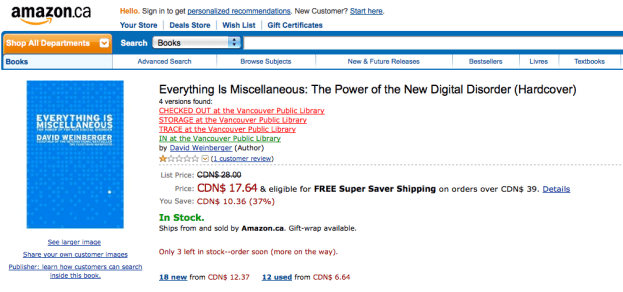
3. Finally, you need to download the VPL-Amazon search script from Steve Tannock’s blog here.

4. While you are at Steve’s blog, write something nice – maybe a thank you note!

5. Go to the Amazon website and search for a book. Under the book title will be a small piece of text letting you know if the VPL has the book in its catalog! (See example picture below) Update: I’m hearing from some users that the script works on the Amazon.ca site but not the Amazon.com site.

I hope this is helpful! And happy searching.

Also, for those who are more technically inclined feel free to improve on the script – fix any bugs (I’m not sure there are any) or make it better!

Amazon shot

Spark Interview on VanTrash – The Open Source Garbage Reminder Service

A couple of weeks ago I was interviewed by the CBC’s Nora Young for her show Spark:  a weekly audio blog of smart and unexpected trendwatching about the way technology affects our lives and world.

The interview (which was fun!) dives a little deeper into some of the cool ways citizens – in working to make their lives better – can make cool things happen (and improve their community) when government’s make their data freely available. The interview focuses mostly on VanTrash, the free garbage reminder service created by Luke Closs and Kevin Jones based on a blog post I wrote. It’s been getting a lot of positive feedback and is helping make the lives of Vancouverites just a little less hectic.

You can read more about the episode here and listen to it on CBC radio at 1:05 local time in most parts of Canada and 4:05 on the west coast.

You can download a podcast of the Spark episode here or listen to it on the web here.

If you live in Vancouver – check out VanTrash.ca and sign up! (or sign your parents or neighbour up!) Never forget to take the garbage out again. It works a whole lot better than this approach my friends mom uses for her:

Van trash reminder

My new mac – some thoughts for other PC users

As some of you know, I recently shifted from a PC to a Mac. It’s a big transition for me… I’ve used a PC all my life, so it is easy to say that I’m having a little (but not a ton) of culture shock.

I’ll be honest about the single best selling feature of the mac: Spotlight.

I do very few things on my computer. Mostly I write, I surf, and I email. A LOT of email. So first and foremost, having a computer where I can find my emails and documents easily is critical. When you’ve got over 70,000 emails you want to be able to search, well, neither Microsoft Outlook, any Windows desktop search engine I’ve ever seen, or even Google desktop (which essentially requires you to load a browser each time) is going to cut it.

I NEED to be able to find stuff quickly. Google has bred me with an expectation of instant results (not a slow churning solution). Maybe Windows 7 will get there, but I’ve given up waiting. My 5 year old thinkpad wasn’t going to last long enough for me to see.

Am I happy? Absolutely. One thing our Apple friends do well is design. I love the keyboard, the screen and pretty much everything physical about the machine. Moreover, the convergence of Mac & Windows software has made the transition relatively easy – I’d be frightened to think of how much time on my computer I spend on the browser, but it is a lot… so moving from Firefox to Firefox is pretty sweet.

That said, the transition hasn’t been perfect. There are several features on the Mac that have been frustrating, and even disappointing. For those thinking of making the leap I thought I let you know the rough parts; it shouldn’t dissuade you, just set some expectations that not everything in Macworld is peaches and cream. Of course, if some veteran users have solutions to these issues, I’ll be eternally grateful.

So here’s my list of 4 things I’d change on the Mac – some of these are so petty I’m almost embarrassed…

1. No “send to” email client option. One thing Windows has that I’ve not found on the Mac is the “Send To” folder. Drop any application in the Send To folder and when you right-click on a document you have the option of opening the document with that application. What I loved was being was being able to right-click on a document, send it to my email client and bingo! A new email was created with the document attached. Very productive and easy. Alas, no such luck in the Mac.

2. No “open container” option in spotlight. Yes, I love Spotlight AND… when the drop down menu is showing me a list of found items, why can’t I right-click on it and open the containing folder? Sometimes, I don’t know what document I’m looking for, but I do know it is co-located with a document I do know the title of… Just saying.

3. In Mail, you can’t drag an email to iCal to create an event. Best feature Outlook (and I presume Entourage) has that Mail and iCal don’t is the ability to turn an email into an event. I know that Mail has the funky – click on the date and it will create an event – but it rarely brings in the relevant information. In Outlook I simply dragged an email to the calendar and presto! I had an event in which the email contents were in the notes. That way I could easily copy all the relevant details and, had a ton of context I could quickly reference within my calendar.

4. Okay, so this one seems REALLY petty… but it strikes at something deeper, something important for PC users to know. I’m feeling a little annoyed that, in Mail, when I delete an email in my inbox the cursor always moves to the newer email regardless how the mail is sorted. In Outlook it always moved “down” (Which I had arranged to mean that it went to an older email). Small, I know, but it is driving me crazy when I’m dealing with my email. Of course, this is all part of what I understand to be a larger philosophical problem with Macs (and why I’ve never been an owner before) which is that the company is centered on the idea that it knows how you should use your computer better than you do… so customizing is limited. This is the biggest culture shift for PC users. Owning a Mac is like being in a gated community… its pretty and manicured, but you have to adhere to the community bylaws, or else…! Yes the Windows world has got serious medical issues (viruses), a generic corporate feel (Windows Themes) and a approach to planning that seems modeled after Houston (I say this with some affection) but you also had a lot more freedom to create trouble or solve things your way. At the moment, I’m welcoming my new overlord because it’s like my computer has been taken over by the Swiss! It’s efficient, but if I try to complain… well you get the point.

Pretty much everything else that I’m wrestling with. The way Alt-Tab works on the Mac or the fact that I can’t open press “command+F” to open the “File” menu are things that I know, in time, I’ll adjust to.

19th Century Net Neutrality (and what it means for the 21st Century)

So what do bits of data and coal locomotive have in common?

It turns out a lot.

In researching an article for a book I’ve discovered an interesting parallel between the two in regard to the issue of Net Neutrality. What is Net Neutrality? It is the idea that when you use the Internet, you do so free of restrictions. That any information you download gets treated the same as any other piece of information. This means that your Internet service provider (say Rogers, Shaw or Bell) can’t choose to provide you with certain content faster than other content (or worse, simply block you from accessing certain content altogether).

Normally the issue of Net Neutrality gets cast in precisely those terms – do bits of data flowing through fibre optic and copper cables get treated the same, regardless of whose computer they are coming from and whose computer they are going to. We often like to think these types of challenges are new, and unique, but one thing I love about being a student of history, is that there are almost always interesting earlier examples to any problem.

Take the late 19th and early 20th century. Although the term would have been foreign to them, Net Neutrality was a raging issue, but not in regard to the telegraph cables of the day.  No, it was an issue in regards to railway networks.

In 1903 the United States Congress passed the Elkins Act. The Act forbade railway companies from offering, and railway customers from demanding, preferential rates for certain types of goods. Any “good” that moved over the (railway) network had to be priced and treated the same as any other “good.” In short, the (railway) network had to be neutral and price similar goods equally. What is interesting is that many railway companies welcomed the act because some trusts (corporations) paid the standard rail rate but would then demand that the railroad company give them rebates.

What’s interesting to me is that

a) Net Neutrality was a problem back in the late 19th and early 20th century; and

b) Government regulation was seen as an effective solution to ensuring a transparent and fair market place on these networks

The question we have to ask ourselves is, do we want to ensure that the 21st century (fibre optic) networks will foster economic growth, create jobs and improve productivity in much the same way the 19th and 20th century (railway) networks did for that era? If the answer is yes, we’d be wise to look back and see how those networks were managed effectively and poorly.  The Elkins Act is an interesting starting point, as it represented progressives efforts to ensure transparency and equality of opportunity in the marketplace so that it could function as an effective platform for commerce.